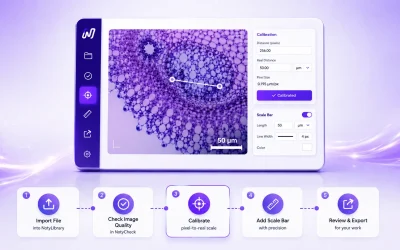
Calibrate an Image and Add an Accurate Scale Bar
Import a microscopy image, select calibration, crop or improve it if needed, then add an accurate scale bar and export the final image.
Tools: Import → Calibration → Edit → Scale & Export
View GuidePress Ctrl+K to search anytime
Every guide takes you from a clear starting point to a verifiable result. Pick the workflow that fits your task and follow the steps — no guessing, no detours, just reliable science.
Import a microscopy image, select calibration, crop or improve it if needed, then add an accurate scale bar and export the final image.
Tools: Import → Calibration → Edit → Scale & Export
View GuideCheck image quality, calibrate scale, measure geometry in real units, and review annotations before export.
Tools: NotyLibrary -> NotyCheck -> NotyCalibration -> NotyMeasure
View GuideCheck the microscopy image, identify phase regions, calculate area percentages, and review overlay readability.
Tools: NotyLibrary -> NotyCheck -> NotyPhase
View GuideCheck cross-section quality, calibrate scale, measure coating or layer thickness, and review the final annotated result.
Tools: NotyLibrary -> NotyCheck -> NotyCalibration -> NotyThickness
View GuidePick any workflow that matches your current task. Each one gives you a complete, repeatable path — so you can build confidence in your process and get results you can stand behind.